
What the panel can do, screen by screen
Every plan gets the same panel - there is no tier where the file manager is read-only or the console is a summary. This is the whole of it, with the steps for each part.
What do you want to do?
The most common things people need, explained step by step.
- Start my first serverPick a game or app, choose a plan and pay. It's ready in about a minute.
- Upload files or install modsUse the file manager in your browser, or connect with an SFTP app.
- Send commands to my serverUse the live console to run commands and see what's happening.
- Back up or restoreSave a copy of your server and roll back if something breaks.
- Restart or back up automaticallySet restarts, backups or commands to run on a timer.
- Let a friend help manage itGive someone access to your server without sharing your password.
- Add a databaseCreate a MySQL database for plugins or your app.
- Deploy from GitHubPush your code and the server updates itself.
- Put my website onlineUpload a site made of HTML, CSS, JavaScript or PHP.
- Run a Discord or Telegram botKeep your bot online 24/7 without leaving your PC on.
- Use my own domainPoint your own web address at your server, with HTTPS.
- My server won't startThe usual reasons, and how to fix each one.
Guides by game
Every game we host. Pick yours to see its guides.
- Minecraft48 guides544 views
- Counter-Strike 210 guides106 views
- FiveM15 guides110 views
- Palworld7 guides72 views
- Valheim109 guides644 views
- Project Zomboid8 guides162 views
- 7 Days to Die6 guides68 views
- Unturned5 guides58 views
- Terraria5 guides83 views
- Garry's Mod7 guides63 views
- DayZ10 guides120 views
- Factorio4 guides42 views
- Satisfactory4 guides32 views
- Team Fortress 22 guides27 views
- Counter-Strike 1.62 guides46 views
- Arma 33 guides22 views
- Insurgency: Sandstorm2 guides32 views
- SCP: Secret Laboratory2 guides38 views
- The Isle3 guides45 views
- Sons of the Forest4 guides41 views
- The Forest2 guides19 views
- Killing Floor 22 guides11 views
- Don't Starve Together2 guides27 views
- Abiotic Factor2 guides20 views
- RimWorld4 guides52 views
- BeamMP (BeamNG.drive)8 guides66 views
- The Front1 guide5 views
- Euro Truck Simulator 22 guides20 views
- Assetto Corsa3 guides28 views
- Skyrim Together2 guides40 views
For developers
Putting your own code on a server - Node.js, Python, websites, bots and databases.
- OverviewWhere your code goes and how the server starts it.
- Node.jsGet an Express, Next.js or other Node app running.
- PythonGet a Python app, API or script running.
- Static sites and web hostingHost a website made of HTML, CSS, JS or PHP.
- Discord and Telegram botsKeep a Discord or Telegram bot online.
- DatabasesFind your database login and connect your app.
- Custom domainsPoint your own web address at your server.
- TroubleshootingWon't start or won't load? Common fixes.
- Using AI assistantsLet Claude or ChatGPT help set up your server.
- VDSConnect over SSH, watch live usage, open a terminal.
- BillingPayments, renewals, trials, crypto and bundles.
Ordering a server
Ordering takes about a minute and happens in three screens: find what you want to run, pick a plan, and pay. Pay by card or PayPal and the server is set up the moment the payment goes through - you can watch it install in its console.
- Takes
- About a minute
- Pay with
- Card, PayPal, crypto or bank transfer
- Billed for
- 1, 3, 6, 12 or 24 months
- Prices in
- US dollars or Georgian lari
Step 1
Open the shop and find what you want to run
panel.renode.space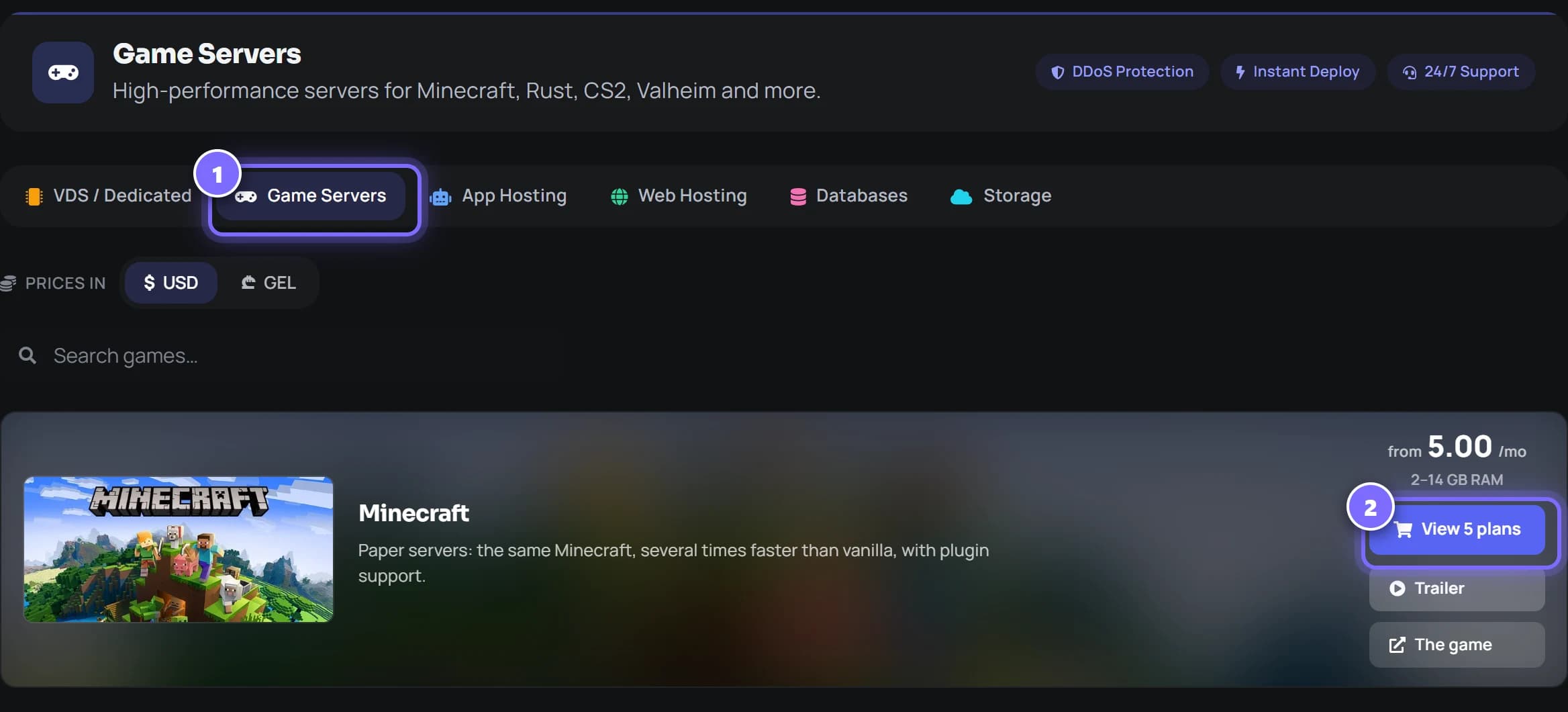
- Sign in to the panel and open the shop. The tabs along the top are the product lines: VDS, Game Servers, App Hosting, Web Hosting and Databases.
- Find your game - there is a search box - and press View plans. The card already shows the lowest price and the range of memory on offer.
Step 2
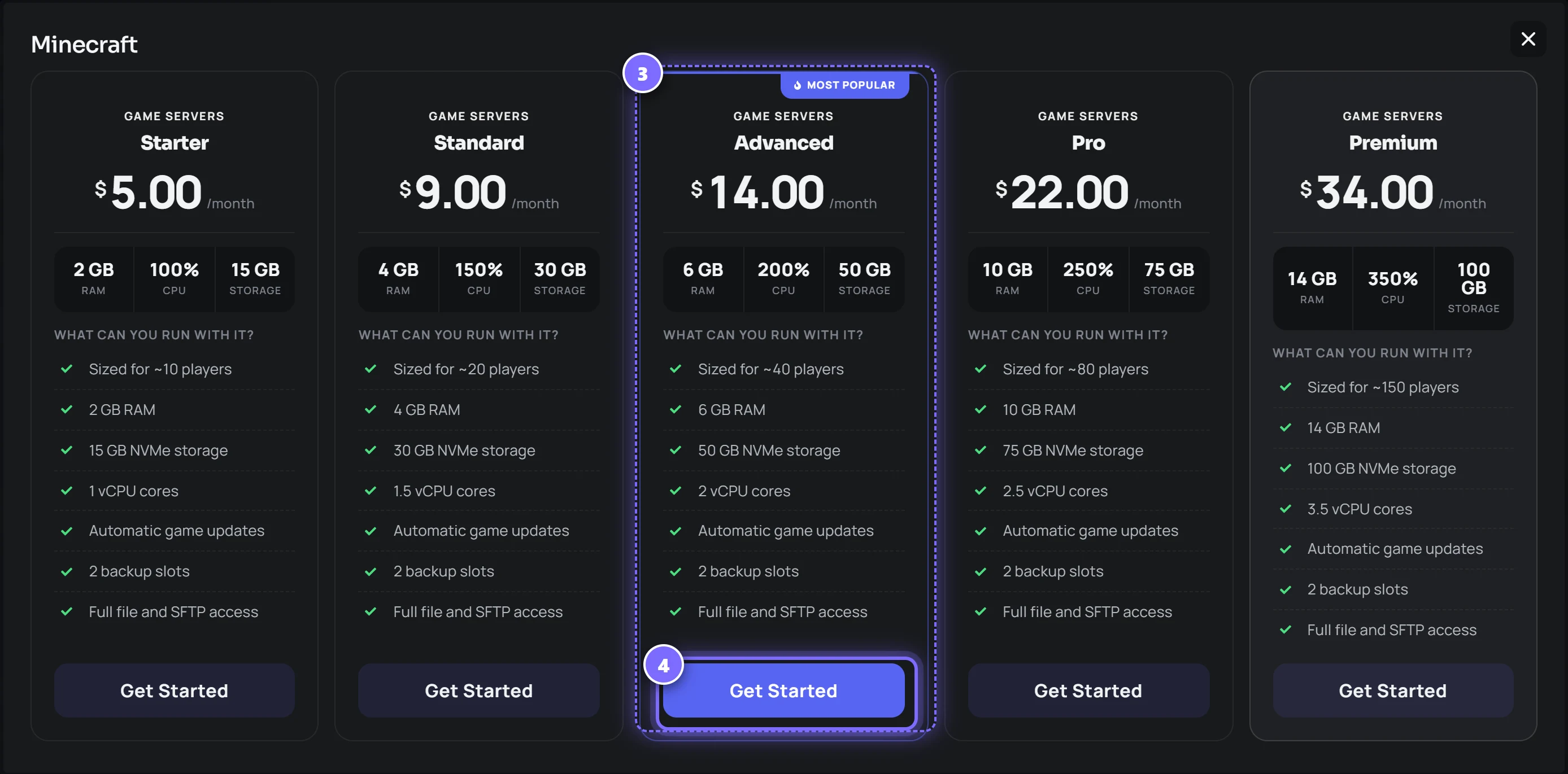
Compare the plans and pick one
panel.renode.space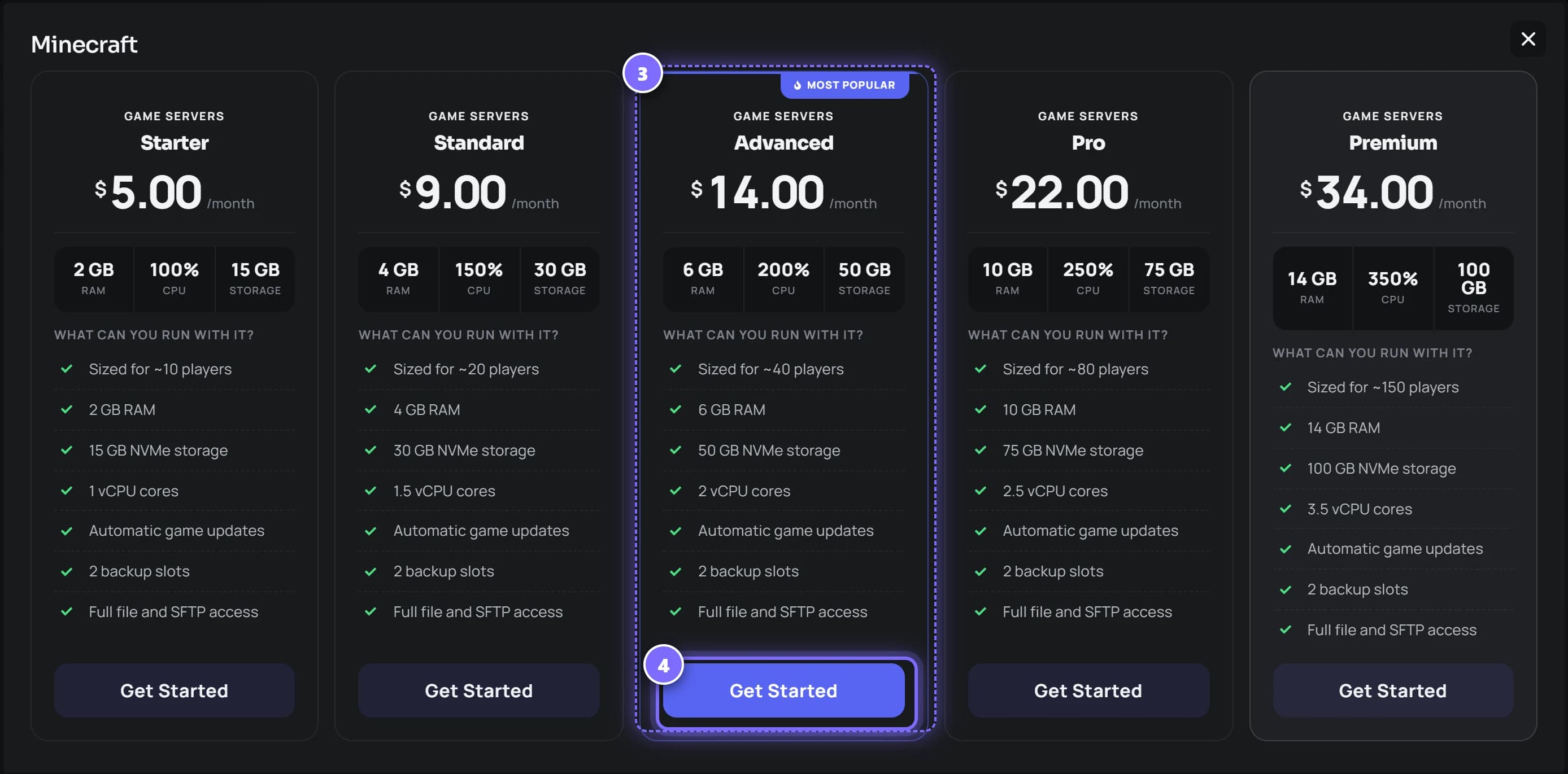
- Every plan lists its memory, CPU and NVMe storage, roughly how many players it suits, and what is included - updates, backup slots, file and SFTP access.
- Press Get Started on the one you want. Not sure? Start smaller: you can move to a bigger plan later without losing your world.
Step 3
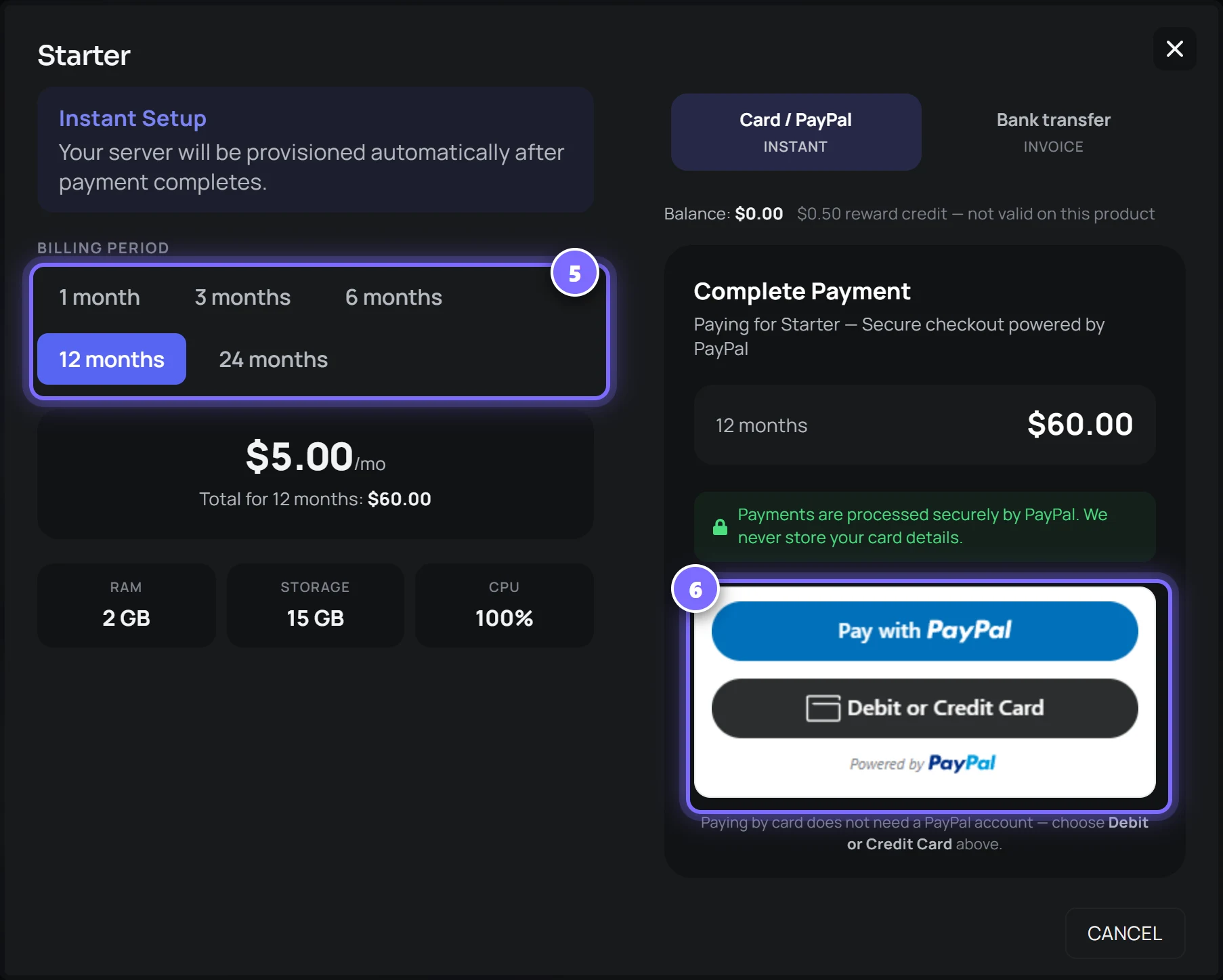
Choose how long, then pay
panel.renode.space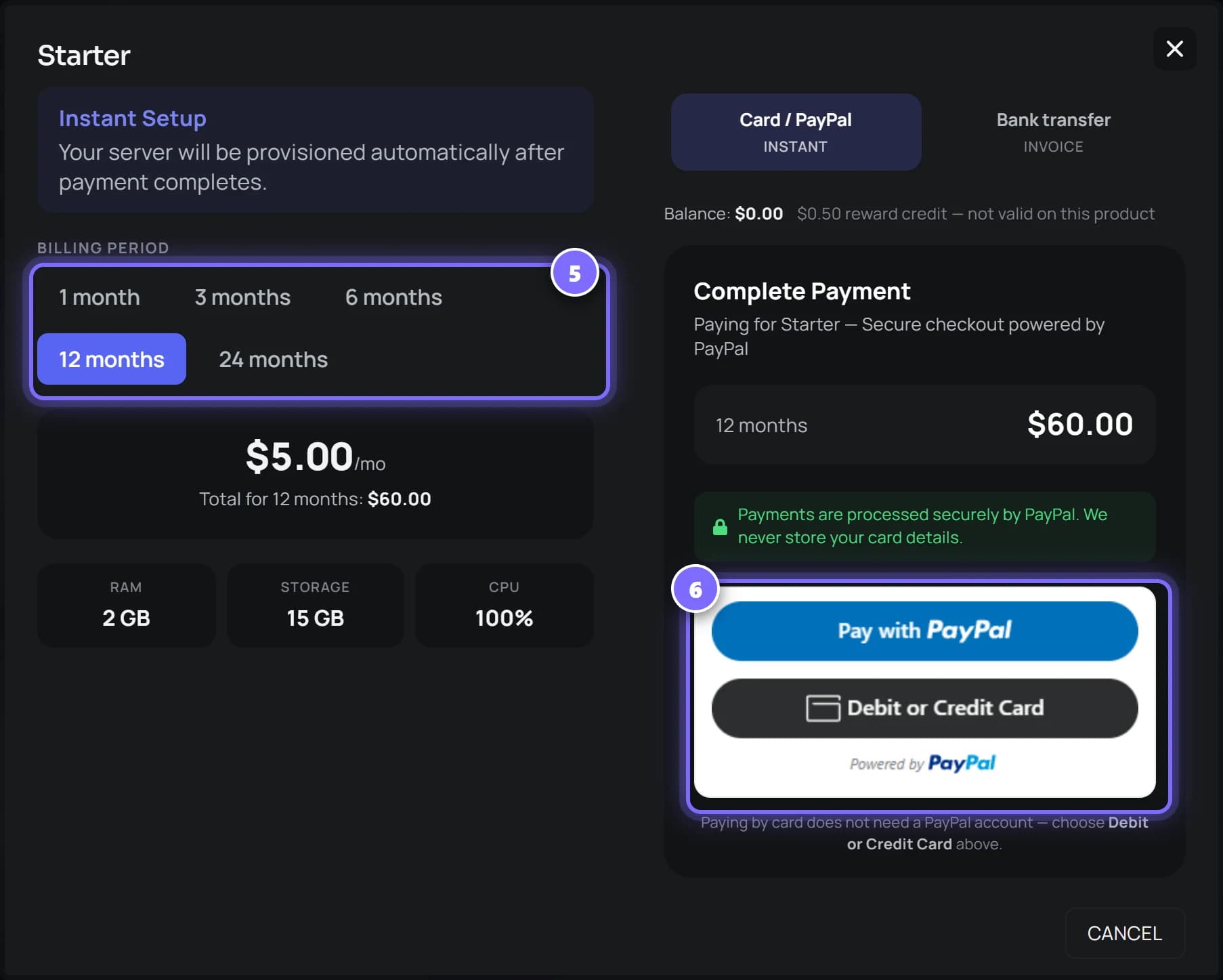
- Pick a billing period - 1, 3, 6, 12 or 24 months. The total for the whole period is shown before you pay, so there are no surprises.
- Pay with PayPal, or press Debit or Credit Card - paying by card does not need a PayPal account. The server is created as soon as the payment completes.
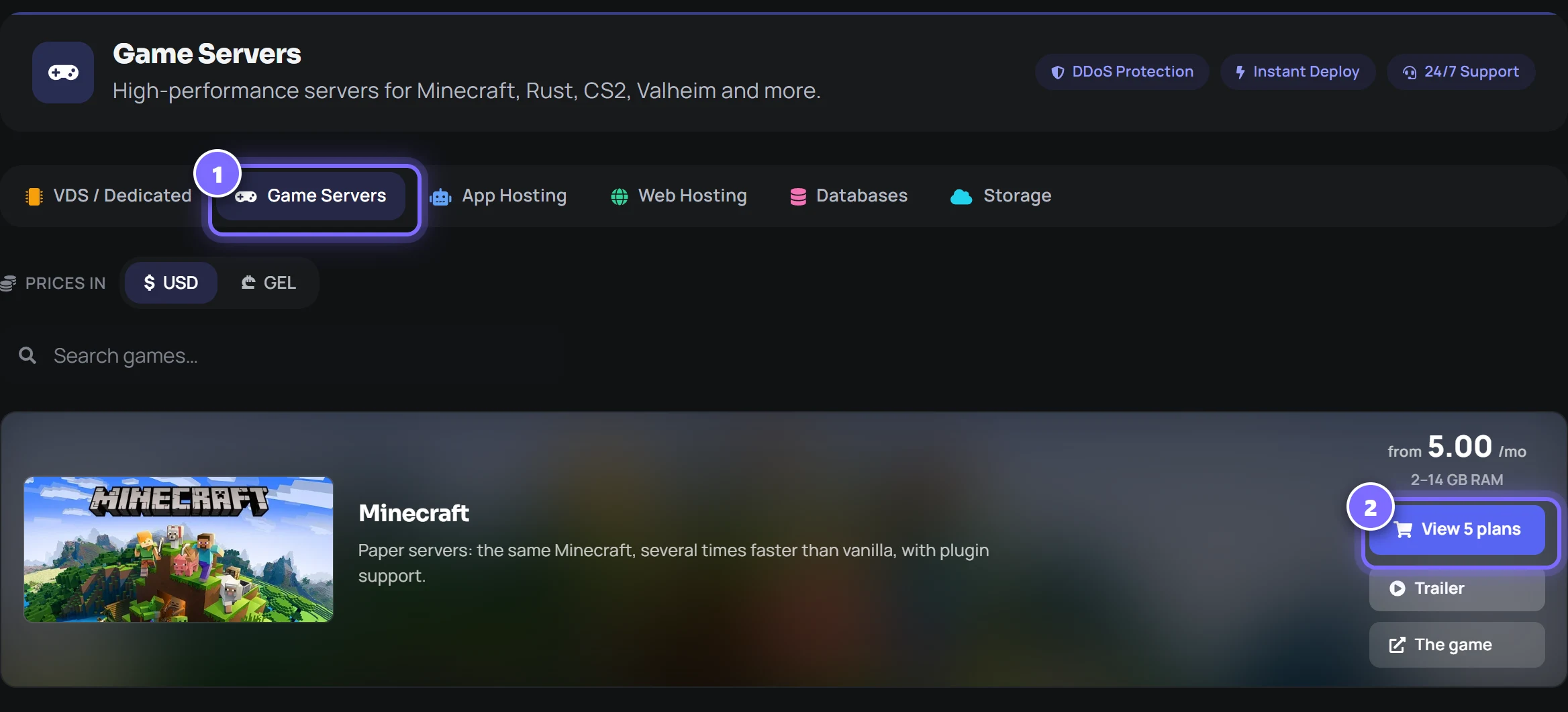
Paying by bank transfer instead
Prefer to pay from your bank? Choose bank transfer at checkout. The server is set up once the payment arrives, usually the next working day.
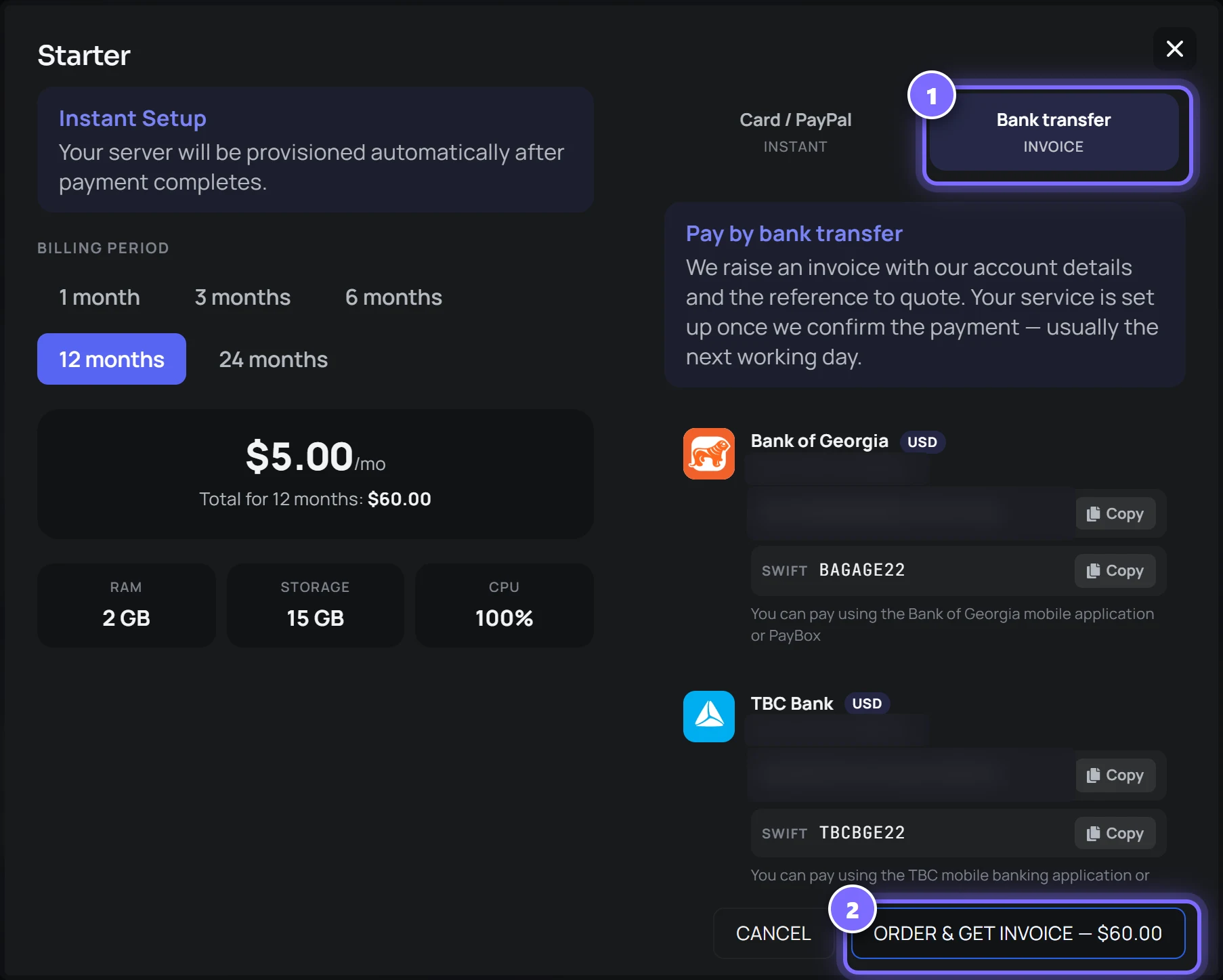
- Switch the payment tab to Bank transfer. The account details for Bank of Georgia and TBC Bank appear, each with a Copy button.
- Press Order & get invoice, then pay that invoice from your banking app, quoting the reference on it.
After you pay
- The server appears under My Servers and installs itself. Open it to watch the install in the console.
- Your orders, invoices and subscriptions are under Finances in the side menu.
- Stuck at any step? Open Support in the side menu and raise a ticket.
Screenshots of the RE:NODE panel. Bank account details are hidden here; you will see them in full at checkout.
Trying a server free
Some plans carry a Try free button: no card, and the server is built the same way a paid one is. Pay before the trial ends and the same server, with the same files, becomes a paid term.
- One trial per account, ever, and the account needs a verified email address.
- Only the smallest tier of a line, and only lines the panel builds automatically - not VDS or S3 storage.
- A day trial runs 24 hours. A month trial lasts 30 days but pauses every 24 hours; press Renew to bring it back for another day.
- When a trial ends the server is kept suspended with its files for 7 days, then deleted. We email you 2 hours before the end and 24 hours before deletion.
- A trial cannot take a renode.space subdomain, and one that holds 90% of its CPU for ten minutes is stopped.
Paying with crypto
Pay with crypto sits beside the other methods in the order and renewal dialogs. You pay on NOWPayments' invoice page - USDT, BTC, ETH, LTC and more - at exactly the plan's price, and the server is created once the payment confirms.
- Confirmation takes 10 to 60 minutes, depending on the network.
- Some coins have minimums - USDT about 11, BTC about 20. For small amounts, use LTC, TRX or ETH.
- Crypto can also top up your wallet balance.
- Send the exact amount, once. An underpayment, or a second send to the same address, is not credited automatically - we review it by hand.
- Bundles and VDS orders cannot be paid in crypto yet.
Bundles
A bundle is two or three plans that belong together - an app server with its database and a cache - bought in one checkout from the Bundles tab of the shop, for less than the plans cost separately.
- One invoice and one renewal date for the whole set.
- A member server cannot be renewed or upgraded on its own, and cancelling one cancels the bundle.
- Pay by card, PayPal or wallet balance. Reward credit and crypto do not pay for bundles.
Loyalty pricing
Loyalty pricing is something we switch on per service, not a box at checkout. If a service of yours is enrolled, the Loyalty page under your account shows its stage and what its next renewal takes off.
- Each month renewed without a gap takes 2% more off, up to 20% at month 11. The first month is full price.
- It stacks with the 3, 6 and 12-month discount, but the two together never pass 35%.
- Paying within the 7-day grace period counts as on time. Past grace, a freeze - once every 12 months - holds your stage for a month.
- Still unpaid, the service steps back 3 months rather than to zero. Cancelling resets it; changing plan does not.
The console
Live output, a command line, power controls and the resource graphs. It is the server's own output rather than a filtered summary - if the game prints it, you see it.
 my-server5.83.153.81:25565RUNNING
- Start, stop, restart and kill, with the current state always visible.
- Command history with the arrow keys, and tab completion for common commands.
- Web-server noise - the internet knocking on doors that are not there - is folded behind a count you can switch off. A real error always prints.
- Graphs for memory, CPU and disk against your limits, so whether it is the plan or the mod is answerable.
- Average Ping and Hops on the stats strip. Press Test now under the console and the round trip is measured from 12 countries; Hops counts the routers between the server and you, shown as ≥N when the last ones do not answer. Your address is not stored.
Working on a server with AI
Above the console is a bar for handing the server to your own assistant - Claude, ChatGPT or Cursor. Pick what the assistant is for, press Connect AI, and a share link is made and copied. Paste it into the assistant and it has the server's context.
We run no model of our own. The link gives your assistant what it needs to help, and passwords and tokens are withheld from everything it reads.
- A read link carries the server's context, the console tail and directory listings, but no file contents.
- Manage this server makes a link that can also start, stop and restart, type into the console and edit files. No link can delete, reinstall, or touch databases, backups, schedules, users or SFTP details.
- Links expire on their own when unused, and a new link for the same purpose replaces the old one. Account, then Connected AI, lists every link and connection with a button to revoke it.
- Server won't start copies a ready-made prompt with the console tail instead of a link.
Support chat in the console
The Chat button in the server header opens a panel that floats over the page, so you can talk to us while looking at the console. It is one conversation per server, between you, your subusers and our staff.
- It works while the server is suspended or its install has failed - the one thing a suspended server still answers.
- Attach files of any kind, up to 100 MB each and ten to a message. Replies, reactions and Seen by are there, and so is whether support is online right now.
- Nothing is emailed: a new message waits under a badge in the panel. It does not replace tickets.
Files and SFTP
A complete file manager with an editor in the browser, plus SFTP credentials for the tools you already use. Upload a modpack, fix a config, pull a world down to your machine.
my-server5.83.153.81:25565RUNNING- Drag files in, or upload a folder. Archives can be unpacked in place.
- Edit any text file with syntax highlighting and save without downloading it.
- PDFs and images preview in the panel rather than downloading first, with buttons to open them in a new tab or download them.
- SFTP on the same credentials - use FileZilla, WinSCP or your editor's remote mode.
Backups
Take one before you try something. Restore it when the something goes wrong. Lock the ones that matter so they are not rotated away.
my-server5.83.153.81:25565RUNNING- Slots on every plan - two on the entry tiers, more further up.
- Take one on demand, or on a schedule you set.
- Download any backup to your own machine.
- Separately, every server is backed up every night, whatever its plan, outside your backup slots. Those are system backups: they are not on the Backups tab, and a restore from one goes through support.
- A game server's database is not inside its file archive, so it is dumped on its own every night.
- We pull copies off the node every day, so a backup does not live only on the machine it protects.
Databases
Create a database from the panel and it comes with a host, a username and a password generated for it. Nothing is shared with anybody else's server.
- A database server - PostgreSQL, MongoDB, MySQL, SQL Server or Valkey - shows its host, port, username, password and connection string in a credentials card on its console page. Click any value to copy it; Show secrets reveals the passwords.
- SQL Server comes with a database already created and set as sa's default, so SSMS opens straight into it. The server name in SSMS is host,port - with a comma.
Subusers, roles and teams
Give somebody the console without giving them your files, or the files without your billing. Three separate ideas, kept apart deliberately.
- A role holds permissions - what may be done.
- A team holds people.
- A grant joins a team to a server with a role, so adding a moderator to the team gives them the same access everywhere at once.
- Invite by link, by a join code, or by email address - and require approval on the codes if you would rather vet people.
- Access can be time-boxed, and expiry stops working immediately rather than overnight.
Scheduled tasks
Restart nightly, back up before the restart, announce it to players first. Tasks run in order with delays between them, so a schedule can be a small routine rather than one action.
- Send a console command - a warning to players, a save, a world flush.
- Take a backup.
- Power actions: start, stop, restart.
Git deploys
For application servers: connect a GitHub repository and branch, and the container pulls it on boot. Switch on deploy-on-push and it restarts itself when you push - and a stopped server is started, so the push goes live either way.
Every deploy is recorded: opened when the push arrives, closed once the container is actually seen running again. That is the difference between a deploy that shipped and a deploy that fell over.
- A pre-flight check card on the GitHub tab reads the repository before you link it and on every visit, and lists what will break, worst first, with a fix to paste - a missing start script, the wrong port or localhost, a missing build, a committed .env. It reads a few files; it never clones.
- Where starter templates are offered for your runtime, Use template opens GitHub's own new-repository page with a project that already binds the right port and passes the check. The panel creates nothing in your account.
- Switch on Keep AI context in the repository and the GitHub App opens a pull request adding .renode/server.md and a block in CLAUDE.md and AGENTS.md, so coding assistants read the server's rules. It commits only to its own branch; you merge. Public repositories get the rules only, never addresses or credentials.
The VDS page
A VDS has its own page: live CPU, memory, disk, swap, load, network and uptime, refreshed every 3 seconds, with small charts of the last two minutes.
Where the browser terminal is switched on, it opens already logged in with the saved credentials, once the panel has checked the login works. Its address works once and carries no password.
Switching the panel to Georgian
The panel is in English and Georgian. The EN / ქა switch sits in the sidebar beside the theme toggle, and on the login page. It changes language without a reload and is remembered on your account.
Games that need a key from you
A few games want a credential their publisher issues to a person - a Steam game-server token, a Steam account that owns the server files, a Klei cluster token, a Cfx.re licence. We cannot create one and we never share one between customers.